Category: Statistics

  • Hi pleas Ineed help for my homework

    Progress Check

    Use this activity to assess whether you and your peers can:

    • Use a five-number summary and a boxplot to describe a distribution.
    • Recognize quartiles as the markers between four equally-sized groups within a distribution of data.
    • Describe the distribution of a quantitative variable grouped by a categorical variable; make comparisons and draw conclusions.

    Directions

    Use the drop-down menu to learn about the three steps needed to complete this assignment.

    Three steps to complete the assignment

    Step 1: Review the Rubric

    • Before you submit your work, review the rubric at the bottom of this assignment.
    • Use the rubric as a checklist to determine whether you are ready to submit your work.

    Step 2: First Draft

    • Commit a good-faith effort to address each item in the Prompt section below.
    • Please be sure to number your responses and include “white space” between problem numbers. This improves the readability and flow of your work. I cannot give feedback and grade jumbled work.
    • Use either of the following options to submit your work.
      OPTION 1: You can submit a text-entry assignment (i.e. typing your answers in Canvas). To learn how to submit a text-entry assignment, use these (opens in a new tab).
      OPTION 2: You can upload your paper-and-pencil work (or the digital equivalent). To learn how to upload your paper-and-pencil work, use these (opens in a new tab). WARNING – some file types may not be visible on my end. So to learn which files you can upload, be sure to use the directions link I provided for this option.
    • Not ready to submit a good-faith effort yet? Avoid frustration – use the link to the Questions, Answers, & Tips discussion board (at the bottom of this page) to post questions about this assignment (or visit the discussion board to answer your classmates’ questions). You can also contact me directly (see the homepage for my contact information).

    Step 3: Optional Final Draft

    • After you submit your good-faith attempt to fully respond to the questions in the Prompt section below, advance to the ANSWER(S) page.
    • You can use the ANSWER(S) page to correct your work and resubmit this assignment any time before I begin grading the problems. However, to earn full credit, you are not required to submit a final draft for this assignment. But if you do submit a final draft, I will only grade it if you submitted a good-faith effort on your first draft.
    • Warning – I will only grade your most recent submission. So if you choose to submit a final draft, please do not leave anything out, and please do not direct me to read an earlier submission. To maximize your score, your most recent submission (at the time I begin grading) must be complete.

    Data

    For this assignment we will use a random sample of 861 participants from the population of Disability IAT participants. Our random sample is titled “Disability IAT Project Sample.”

    • Login and open StatCrunch ().
    • Open Disability IAT Project Sample in StatCrunch ().

    Variables

    Quantitative Variable: IAT-Disabled-Score
    Score on the Disability IAT where the participant is tested to determine the participant’s implicit attitude toward disabled and abled people.

    Categorical Variable: Prefers
    Multiple-choice response to a survey question about the participant’s explicit attitude toward disabled and abled people.

    Disability IAT (opens in a new tab).


    Prompt

    We’ll describe the distribution of the quantitative variable grouped by the categorical variable. Then we’ll make comparisons and draw conclusions.

    1. Make an appropriate graph and provide a table of appropriate numerical summaries.
      • Use StatCrunch to make side-by-side (or stacked) boxplots for the quantitative variable grouped by the categorical variable. ().
      • Embed your StatCrunch graph in your response, and be sure to include the Alt Text. Complete each of the following to make the graph more meaningful to the reader.
        • Include a meaningful title above your graph.
        • Underneath your graph, describe the variables represented in the graph.
        • You’ll notice that there are numbers on the axis representing the categorical variable. These numbers are actually the group labels for the categorical variable. You’ll need to let the reader know which numbers represent which categories (groups). Below your graph, provide a key for the numerical labels in your graph. Hint: see the category (group) descriptions for the categorical variable in the variable descriptions list for your IAT data set above.
      • Use StatCrunch to make one table of the five-number summaries for the groups of the categorical variable. ()
      • Copy and paste the StatCrunch table of numerical summaries into your response.
        • Again, the numbers in the first column of your table represent the groups of your categorical variable. The reader will not know what these numbers mean! To make it easier for the reader to understand your table, replace the numerical category labels in the first column with meaningful words. Hint: see the category descriptions for the categorical variable in the variable descriptions list for your IAT data set above.
    2. Choose two or three groups of the categorical variable that are most interesting to compare. Then use percentages and descriptions of center and spread to make comparisons. What do the data suggest? For example, is a particular group from the categorical variable more likely to have a higher/lower IAT score?
      • Use the data to support your answer.
      • Interpret the result in context. Hint: to learn how to interpret the IAT score, see the variable descriptions link for your IAT data set (included in the Variables section above).

    List of StatCrunch Directions

    Click here for StatCrunch Directions

    Each link will open in a new window. To return to this assignment, either close the new tab or select the tab for this assignment.

    • (You only need to do this once.)
    • (no screenshots; please use these directions)
    • (no attachments; please use these directions)
    • (or stacked boxplots)

    Module 9 Discussion Board

    Use the Module 9 (opens in a new tab) to ask questions or provide feedback about the problems in any Module 9 activity – including this peer-reviewed assignment.


    Review Feedback

    • Instructor feedback is only available after an assignment is graded.
    • Use these (opens in a new tab) to learn how to review feedback.

    Click the “Next” or > button to continue.

    Content by Cuyamaca College math faculty and licensed under the .

    Rubric

    Formative Assessments w/ StatCrunch

    Formative Assessments w/ StatCrunch

    Criteria Ratings Pts

    This criterion is linked to a Learning OutcomeAnswering the Prompt

    8 ptsFull CreditThe first submission demonstrates a good-faith effort to address each part of the Prompt. Either in the first draft or the optional final draft, all parts of the “Prompt” are addressed and the responses demonstrate attainment of the learning objectives in the “Progress Check” section of the assignment. The answers are correct. The writing/work is clear. The explanation/work is reasonable, well-organized, and easy to follow.6.5 ptsMostly CorrectThe first submission demonstrates a good-faith effort to address most of the Prompt. In the optional final draft all parts of the “Prompt” are addressed, and the responses demonstrate attainment of the learning objectives in the “Progress Check” section of the assignment. The answers are mostly correct. The writing/work is clear. The explanation/work is reasonable, well-organized, and easy to follow.

    3.5 ptsOne or more incorrectThe first submission demonstrates a good-faith effort to respond to a smaller portion of the Prompt. In the first draft or the optional final draft, one or more parts of the “Prompt” are not addressed or are incorrect. Or, answers do not demonstrate attainment of the learning objectives in the “Progress Check” section of the assignment. Or, answers are correct, but the writing/work is unclear, incorrect, or difficult to follow.0 ptsNo MarksThe first submission does not demonstrate a good-faith effort to address the Prompt.

    8 pts

    This criterion is linked to a Learning OutcomeStatCrunch

    2 ptsFull CreditStatCrunch graphs and/or tables are correct and embedded with your work.1 ptsPartial CreditStatCrunch graphs and/or tables are incorrect or missing important information.

    0 ptsNo CreditNo StatCrunch information is embedded with your post. Or all StatCrunch work is incorrect.

    2 pts

    Total Points: 10

    Requirements: 15 h

  • Demographic statistics of Arizona using US Census data

    Overview This assignment consists of two parts: a Word (or text) document, and an Excel file. Both parts must be submitted. Objectives Calculate basic demographic statistics using Excel and US Census data. Describe the state of Arizona using appropriate measures of central tendency. Explain diversity in Arizona using appropriate measures of dispersion. Instructions Part 1: Follow the steps below and submit your response in an Excel document Download the Module 3 Assignment Excel workbook Download Module 3 Assignment Excel workbook. Along the bottom of this Workbook, you will see the following worksheet tabs: Instructions, Codebook, MasterData, Calculations, Table, and Visual Displays. The Codebook gives the original Census variable names in the left column, and the shorter variable names you will see across the top of MasterData and Calculations. MasterData and Calculations are identical. If you learn nothing else in this class, it is to save a Master copy of every data set you use in life, and to make a copy for calculations. That way, when you make a mistake, you can always go back to the MasterData to find the original data that has not been manipulated or changed. Using the Calculations worksheet and the Excel instructions throughout the textbook Chapter 3 reading: Fill in the Table worksheet. Specifically, calculate the mean, median, range, standard deviation, and coefficient of variation for each indicator/variable. Using the Calculations worksheet, generate one chart depicting a box and whisker plot for each of the racial/ethnic groups in Arizona. Copy that chart to the Visual Displays worksheet Make sure your box and whisker plots have a title, axis titles, and legend. You can see an example of a chart depicting educational attainment at the bottom of the Visual Displays worksheet. Be sure to answer the five questions on that page: Which racial/ethnic group has the largest interquartile range? Which racial/ethnic group is skewed right (positively skewed)? For which racial/ethnic group are the mean and median the same? Which racial/ethnic group is most skewed left (negatively skewed)? Consider the outliers in the chart and complete the provided table. Part 2: Follow the steps below and submit your response in a Word document Imagine that you work for a new Cabinet Secretary for the President. She has never been to Arizona before. She requests that you write a one-page single spaced brief that will help her understand the State as a whole, but she is also interested in variability around the state since she will be visiting each of the 14 counties. Your brief should follow these guidelines: Do not discuss every possible indicator/variable Remember: you are the analyst, so you have a lot of authority over what you emphasize in a brief Be sure you help her understand central tendency and dispersion for each of the indicator/variable groups in the Table (e.g., Population and Age Structure, Racial and Ethnic Groups, Living Arrangements, Education and Income, and Immigration and Language). Use actual words and approximations to brief her i.e., not the variable names, not statistical jargon, whole numbers For example: The average percentage of the population with at least a bachelor’s degree is nearly 21%, but there is a lot of variability among counties, from 12% in La Paz County to nearly one-third in Coconino County.
  • Managerial statistics financial services paper

    Many people will view complaints in a negative sense-something went wrong, or “I failed.” But as Jack points out, opportunity lies in the complaint. Taking the complaint as an opportunity is the best mindset when approaching quality control. If the consumer truly believes you are trying to help them, all too frequently, their opinion changes to a positive state.

    The Consumer Complaint Database is hosted by the U.S. General Services Administration on the DATA.gov webpage. It is a registry of complaints about consumer financial products and services filed with the Consumer Financial Protection Bureau. The database is huge, consisting of over 4.5M lines, so there are lots of opportunities in it.

    The central task in this case study is to determine if the resolved financial complaints filed against Equifax in Texas are under control, explain why, and provide recommendations for bringing the process back under control (if applicable). This assignment consists of collecting complaint data for the company for the years 2020 until the current month and year, counting the number of completed complaints (i.e., closed, not in progress) monthly (excluding the current month, which would include incomplete data), developing a 3-sigma control chart for the number of complaints per month, and analyzing the chart. The introductory video below provides a very brief introduction. Detailed instructions are in the step tabs

    To do list

    1. DATA: Follow the Step 1 tab to download the CFPB data from data.gov.
    2. EXTRACT: Follow the Step 2 tab to extract only the data needed from the CSV file you downloaded from CFPB.
    3. CHART: Follow the Step 3 tab to manipulate the data into proper form and build the necessary control charts.
    4. INTERPRET: Follow the Step 4 tab and interpret the control chart.
    5. WRITE: Follow the Step 5 tab for writing instructions and to submit your paper. (Due Date 1)

    Step one

    Data:

    Introduction

    Begin by downloading and reading the instructions in the Case Study 1 file below. Then go to the DATA.GOV website and acquire the CSV data file. Once you have the data, move to STEP 2.

    Case File

    Data

    Go to the data.gov website and download the data in a comma-separated values (CSV) file. CSV files are text files with values separated by commas. They can hold vast quantities of data beyond the limits of Excel. The file you will download is millions of lines long and will take some time to complete. Use this link or the link in the references to access the file.

    Step two extract data

    The CSV file you just downloaded is large and in a zip file. Excel cannot open it. You need to extract the file from the zip folder first. To do that, use the Extract all option in Windows File Explorer, or on a Mac, simply double-click the .zip file in Finder. Next, we will extract specific lines from the file using a Power Query. Interpret the assignment file in STEP 1 to determine the criteria of the lines you need to extract. The videos below show how to use Power Query, but do not show the full criteria of the lines you need to extract.

    Ex:

    Step 3 make a chart

    Instructions

    Now that you have the data out of the CSV, we need a way to manipulate the observations into a form that will allow us to develop a control chart. The best tool for doing that is called a SumProduct. Watch the instructional video on using the SumProduct command in Excel to manipulate your data into a format for a quality control chart. Finally, build the needed control chart(s) following the Lessons in Quality Control instructions.

    Step 4 interpret

    The instructional materials section 18.1 tab provided a little more information about interpreting control charts. It also provided the following table from SPC for Excel’s webpage, a great reference. You might want to review some more of the SPC for Excel material before proceeding. To get you started, here is an article by Bill McNeesse from SPC for

    After reviewing the Bill McNeese article (there are many SPC resources available on the Internet), watch his video using the link below in the Instructional Video area.

    Step 5 write

    With Henry Ford’s, Jack Ma’s, and Warren Buffet’s (top of the page) words in mind, write a professional quality report with interpretations and recommendations for the executive team at Equifax. Include the chart(s) that you developed. Review the instructions in the case study assignment sheet under STEP 1. Links to the text by Hare et al. (2023) and the chapter by Ashton (2022), Consultation and Research Report Writing, are provided in the Reference section to assist you in writing your report. Hare et al.’s Chapter 2 and Ashton’s Chapter 15 addresses business report writing.

    • Several ebook readers, also called viewers, are available. I think the one that works best is the for PCs and Macs.
    • After downloading the text from the reference section and installing Kindle, you can add the two texts by opening Kindle in the Library, clicking File, and then clicking Import a Local PDF.
    • Watch the how to work with the eBook video:

    In writing your report, consider the consumer or reader of the report as the executive team at Equifax, not your professor. To further assist you, you can submit the paper, and Turnitin will examine the file for plagiarism or potential errors in citing sources. After submitting the paper, give the system a few minutes to generate the report.

  • Project 2

    MAT 240 Project Two Guidelines and Rubric

    Competency

    In this project, you will demonstrate your mastery of the following competency:

    • Apply statistical techniques to address research problems
    • Perform hypothesis testing to address an authentic problem

    Overview

    In this project, you will apply inference methods for means to test your hypotheses about the housing sales market for a region of the United States. You will use appropriate sampling and statistical methods.

    Scenario

    You have been hired by your regional real estate company to determine if your regions housing prices and housing square footage are significantly different from those of the national market. The regional sales director has three questions that they want to see addressed in the report:

    1. Are housing prices in your regional market lower than the national market average?
    2. Is the square footage for homes in your region different than the average square footage for homes in the national market?
    3. For your region, what is the range of values for the 95% confidence interval of square footage for homes in your market?

    You are given a real estate data set that has houses listed for every county in the United States. In addition, you have been given national statistics and graphs that show the national averages for housing prices and square footage. Your job is to analyze the data, complete the statistical analyses, and provide a report to the regional sales director. You will do so by completing the Project Two Template located in the What to Submit area below.

    Directions

    Introduction

    1. Region: Start by picking one region from the following list of regions:
    2. West South Central, West North Central, East South Central, East North Central, Mid Atlantic
    3. Purpose: What is the purpose of your analysis?
    4. Sample: Define your sample. Take a random sample of 500 house sales for your region.
    5. Describe what is included in your sample (i.e., states, region, years or months).
    6. Questions and type of test: For your selected sample, define two hypothesis questions (see the Scenario above) and the appropriate type of test for each. Address the following for each hypothesis:
    7. Describe the population parameter for the variable you are analyzing.
    8. Describe your hypothesis in your own words.
    9. Identify the hypothesis test you will use (1-Tail or 2-Tail).
    10. Level of confidence: Discuss how you will use estimation and confidence intervals to help you solve the problem.

    1-Tail Test

    1. Hypothesis: Define your hypothesis.
    2. Define the population parameter.
    3. Write null (Ho) and alternative (Ha) hypotheses. Note: For means, define a hypothesis that is less than the population parameter.
    4. Specify your significance level.
    5. Data analysis: Summarize your sample data using appropriate graphical displays and summary statistics and confirm assumptions have not been violated to complete this hypothesis test.
    6. Provide at least one histogram of your sample data.
    7. In a table, provide summary statistics including sample size, mean, median, and standard deviation. Note: For quartiles 1 and 3, use the quartile function in Excel:
    8. =QUARTILE([data range], [quartile number])
    9. Summarize your sample data, describing the center, spread, and shape in comparison to the national information (under Supporting Materials, see the National Summary Statistics and Graphs House Listing Price by Region PDF). Note: For shape, think about the distribution: skewed or symmetric.
    10. Check the conditions.
    11. Determine if the normal condition has been met.
    12. Determine if there are any other conditions that you should check and whether they have been met. Note: Think about the central limit theorem and sampling methods.
    13. Hypothesis test calculations: Complete hypothesis test calculations.
    14. Calculate the hypothesis statistics.
    15. Determine the appropriate test statistic (t). Note: This calculation is (mean target)/standard error. In this case, the mean is your regional mean, and the target is the national mean.
    16. Calculate the probability (p value). Note: This calculation is done with the T.DIST function in Excel:
    17. =T.DIST([test statistic], [degree of freedom], True) The degree of freedom is calculated by subtracting 1 from your sample size.
    18. Interpretation: Interpret your hypothesis test results using the p value method to reject or not reject the null hypothesis.
    19. Relate the p value and significance level.
    20. Make the correct decision (reject or fail to reject).
    21. Provide a conclusion in the context of your hypothesis.

    2-Tail Test

    1. Hypotheses: Define your hypothesis.
    2. Define the population parameter.
    3. Write null and alternative hypotheses. Note: For means, define a hypothesis that is not equal to the population parameter.
    4. State your significance level.
    5. Data analysis: Summarize your sample data using appropriate graphical displays and summary statistics and confirm assumptions have not been violated to complete this hypothesis test.
    6. Provide at least one histogram of your sample data.
    7. In a table, provide summary statistics including sample size, mean, median, and standard deviation. Note: For quartiles 1 and 3, use the quartile function in Excel:
    8. =QUARTILE([data range], [quartile number])
    9. Summarize your sample data, describing the center, spread, and shape in comparison to the national information. Note: For shape, think about the distribution: skewed or symmetric.
    10. Check the assumptions.
    11. Determine if the normal condition has been met.
    12. Determine if there are any other conditions that should be checked on and whether they have been met. Note: Think about the central limit theorem and sampling methods.
    13. Hypothesis test calculations: Complete hypothesis test calculations.
    14. Calculate the hypothesis statistics.
    15. Determine the appropriate test statistic (t). Note: This calculation is (mean target)/standard error. In this case, the mean is your regional mean, and the target is the national mean.]
    16. Determine the probability (p value). Note: This calculation is done with the TDIST.2T function in Excel:
    17. =T.DIST.2T([test statistic], [degree of freedom]) The degree of freedom is calculated by subtracting 1 from your sample size.
    18. Interpretation: Interpret your hypothesis test results using the p value method to reject or not reject the null hypothesis.
    19. Compare the p value and significance level.
    20. Make the correct decision (reject or fail to reject).
    21. Provide a conclusion in the context of your hypothesis.
    22. Comparison of the test results: Revisit Question 3 from the Scenario section: For your region, what is the range of values for the 95% confidence interval of square footage for homes?
    23. Calculate and report the 95% confidence interval. Show or describe your method of calculation.

    Final Conclusions

    1. Summarize your findings: In one paragraph, summarize your findings in clear and concise plain language.
    2. Discuss: Discuss whether you were surprised by the findings. Why or why not?

    You can use the following tutorial that is specifically about this assignment:

    What to Submit

    To complete this project, you must submit the following:

    : Use this template to structure your report and submit the finished version as a Word document. Also submit your Excel file showing all steps and calculations used in the report.

    Supporting Materials

    The following resources may help support your work on the project:

    Data Set:

    Use this data for input in your project report.

    Document:

    Use this data for input in your project report.

    Use these tutorials for support with the Excel functions you will use in the project:

    • Tutorial:
    • Tutorial:
    • Tutorial:
    • Tutorial:

    Project Two Rubric

    CriteriaExceeds ExpectationsMeets ExpectationsPartially Meets ExpectationsDoes Not Meet ExpectationsValueIntroduction: PurposeExceeds expectations in an exceptionally clear manner (100%)Provides the purpose of the report (85%)Shows progress toward meeting expectations, but with errors or omissions; areas for improvement may include missing or inaccurate samples or hypotheses (55%)Does not attempt criterion (0%)5Introduction: SampleN/ADescribes what is included in the defined random sample (i.e., states, regions, or the period of time used) (100%)Shows progress toward meeting expectations, but with errors or omissions; areas for improvement may include inaccurate or very limited descriptions of what is included in the random sample (55%)Does not attempt criterion (0%)5Introduction: Questions and Type of TestExceeds expectations in an exceptionally clear and insightful manner (100%)Describes the population parameter, two hypothesis questions, and identifies the type of test for each for the defined random samples (85%)Shows progress toward meeting expectations, but with errors or omissions; areas for improvement may include missing or inaccurate descriptions, definitions, or questions (55%)Does not attempt criterion (0%)5Introduction: Level of ConfidenceExceeds expectations in an exceptionally clear, insightful, or sophisticated manner (100%)Discusses how estimation and confidence intervals will be used to help solve the problem (85%)Shows progress toward meeting expectations, but with errors or omissions; areas for improvement may include missing or inaccurate examples of how estimation and confidence intervals will be used to help solve the problem (55%)Does not attempt criterion (0%)101-Tail Test: HypothesisN/ADefines the hypothesis by defining the population parameter, writing null and alternative hypotheses, and specifying the significance level (100%)Shows progress toward meeting expectations, but with errors or omissions; areas for improvement may include missing or inaccurate definitions and specifications (55%)Does not attempt criterion (0%)51-Tail Test: Data AnalysisExceeds expectations in an exceptionally clear, insightful, or sophisticated manner (100%)Summarizes sample data using appropriate graphical displays and summary statistics, and checks the assumptions by determining if the normal condition has been met, along with other conditions, and compares with national information (85%)Shows progress toward meeting expectations, but with errors or omissions; areas for improvement may include inaccurate or insufficient analyses, summaries, or condition checks (55%)Does not attempt criterion (0%)51-Tail Test: Complete Hypothesis Test CalculationsN/ACompletes the hypothesis test calculation (100%)Shows progress toward meeting expectations, but with errors or omissions; areas for improvement may include inaccurate or inappropriate calculations, statistics, and/or graphs (55%)Does not attempt criterion (0%)51-Tail Test: InterpretationExceeds expectations in an exceptionally clear, insightful manner (100%)Interprets hypothesis test results using the p value method to reject or not reject the null hypothesis by relating the p value and significance level, making the correct decision to reject or fail to reject, and providing a contextualized conclusion (85%)Shows progress toward meeting expectations, but with errors or omissions; areas for improvement may include inaccurate or insufficient interpretations or conclusions (55%)Does not attempt criterion (0%)52-Tail Test: HypothesesN/ADefines the hypothesis by defining the population parameter, writing null and alternative hypotheses, and stating the significance level (100%)Shows progress toward meeting expectations, but with errors or omissions; areas for improvement may include missing or inaccurate definitions and specifications (55%)Does not attempt criterion (0%)52-Tail Test: Data AnalysisExceeds expectations in an exceptionally clear, insightful, or sophisticated manner (100%)Summarizes sample data using appropriate graphical displays and summary statistics, and checks the assumptions by determining if the normal condition has been met, along with other conditions (85%)Shows progress toward meeting expectations, but with errors or omissions; areas for improvement may include inaccurate or insufficient analysis, summaries, or condition checks (55%)Does not attempt criterion (0%)52-Tail Test: Hypothesis Test CalculationsN/ACompletes the hypothesis test calculation (100%)Shows progress toward meeting expectations, but with errors or omissions; areas for improvement may include inaccurate or inappropriate calculations, statistics, and/or graphs (55%)Does not attempt criterion (0%)52-Tail Test: InterpretationExceeds expectations in an exceptionally clear, insightful manner (100%)Interprets hypothesis test results using the p value method to reject or not reject the null hypothesis by relating the p value and significance level, making the correct decision to reject or fail to reject, and providing a contextualized conclusion (85%)Shows progress toward meeting expectations, but with errors or omissions; areas for improvement may include inaccurate or insufficient interpretations or conclusions (55%)Does not attempt criterion (0%)102-Tail Test: Comparison of the Test ResultsN/ACalculates the 95% confidence interval and describes method of calculation (100%)Shows progress toward meeting expectations, but with errors or omissions; areas for improvement may include inaccurate calculations or interpretations (55%)Does not attempt criterion (0%)5Final Conclusions: Summarize Your FindingsExceeds expectations in an exceptionally clear, insightful, sophisticated manner (100%)Summarizes findings in clear and concise plain language (85%)Shows progress toward meeting expectations, but with errors or omissions; areas for improvement may include inaccurate or insufficient interpretations and/or conclusions (55%)Does not attempt criterion (0%)10Final Conclusions: DiscussExceeds expectations in an exceptionally clear, insightful, or sophisticated, manner (100%)Discusses whether the findings were surprising and why (85%)Shows progress toward meeting expectations, but with errors or omissions; areas for improvement may include providing more details and evidence to support the response (55%)Does not attempt criterion (0%)10Clear CommunicationExceeds expectations with an intentional use of language that promotes a thorough understanding (100%)Consistently and effectively communicates in an organized way to a specific audience (85%)Shows progress toward meeting expectations, but communication is inconsistent or ineffective in a way that negatively impacts understanding (55%)Shows no evidence of consistent, effective, or organized communication (0%)5Total:100%
  • MAT-240 8-1 Discussion Reflection

    • What are some practical uses in your own life for the skills you gained in this class?
    • How is data analysis changing in the world around you, including workplaces?
    • How can statistics be persuasive and misleading? Please provide an example.

    Requirements: 1-2 Paragraphs

  • Statistical analysis and results presentation for a thesis (…

    Statistical analysis and presentation of the results of a thesis is needed. The theoretical part and the target of the research is provided together with the sample in excel. It is asked the results section with full analysis and the files that will be used for the analysis to be provided.

    Attached Files (PDF/DOCX): SERVQUAL_Q(1)(1)(1)_EN_1.docx, Master Template 2025(1)(1).docx

    Note: Content extraction from these files is restricted, please review them manually.

  • a quick discussion needed done

    just a quick stats disscusiom i need to be completed

    Requirements: however needed

  • homework Problem set

    please do this problem set 2, this is the instructionns the professor provided , Your submission must be a single file (.pdf, .doc, or .docx). If parts of your submission are handwritten, be sure that your work is neat, legible, and organized. For questions requiring Excel, copy-paste your graphs, formulas, etc. into your document. Do not submit the Excel file itself.

    Requirements:

  • hi pleas I need help for my homework

    Progress Check

    Use this activity to assess whether you and your peers can:

    • Use a five-number summary and a boxplot to describe a distribution.
    • Recognize the median as the center between two equally-sized groups within a distribution of data.
    • Use the IQR to describe the spread for the middle 50% of a data set.
    • Recognize the limitations of a boxplot.

    Directions

    Use the drop-down menu to learn about the three steps needed to complete this assignment.

    Three steps to complete the assignment

    Step 1: Review the Rubric

    • Before you submit your work, review the rubric at the bottom of this assignment.
    • Use the rubric as a checklist to determine whether you are ready to submit your work.

    Step 2: First Draft

    • Commit a good-faith effort to address each item in the Prompt section below.
    • Please be sure to number your responses and include “white space” between problem numbers. This improves the readability and flow of your work. I cannot give feedback and grade jumbled work.
    • Use either of the following options to submit your work.
      OPTION 1: You can submit a text-entry assignment (i.e. typing your answers in Canvas). To learn how to submit a text-entry assignment, use these (opens in a new tab).
      OPTION 2: You can upload your paper-and-pencil work (or the digital equivalent). To learn how to upload your paper-and-pencil work, use these (opens in a new tab). WARNING – some file types may not be visible on my end. So to learn which files you can upload, be sure to use the directions link I provided for this option.
    • Not ready to submit a good-faith effort yet? Avoid frustration – use the link to the Questions, Answers, & Tips discussion board (at the bottom of this page) to post questions about this assignment (or visit the discussion board to answer your classmates’ questions). You can also contact me directly (see the homepage for my contact information).

    Step 3: Optional Final Draft

    • After you submit your good-faith attempt to fully respond to the questions in the Prompt section below, advance to the ANSWER(S) page.
    • You can use the ANSWER(S) page to correct your work and resubmit this assignment any time before I begin grading the problems. However, to earn full credit, you are not required to submit a final draft for this assignment. But if you do submit a final draft, I will only grade it if you submitted a good-faith effort on your first draft.
    • Warning – I will only grade your most recent submission. So if you choose to submit a final draft, please do not leave anything out, and please do not direct me to read an earlier submission. To maximize your score, your most recent submission (at the time I begin grading) must be complete.

    Context

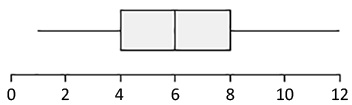
    Here is a boxplot for a distribution of data.

    boxplot


    Prompt

    1. Calculate the IQR for the boxplot shown.
    2. Make up a data set (n = 10) that has the same minimum value, same median, and same maximum value, but a larger IQR than the boxplot shown. List your data set and then describe your strategy.
    3. Make up another data set (n = 10) that has the same minimum value, same median, and same maximum value, but a smaller IQR than the boxplot shown. List your data set and then describe your strategy.

    Module 9 Discussion Board

    Use the Module 9 (opens in a new tab) to ask questions or provide feedback about the problems in any Module 9 activity – including this peer-reviewed assignment.


    Review Feedback

    • Instructor feedback is only available after an assignment is graded.
    • Use these (opens in a new tab) to learn how to review feedback.

    Click the “Next” or > button to continue.

    Content by Cuyamaca College math faculty and licensed under the .

    Rubric

    Formative Assessments

    Formative Assessments

    Criteria Ratings Pts

    This criterion is linked to a Learning OutcomeAnswering the Prompt

    10 ptsFull CreditThe first submission demonstrates a good-faith effort to address each part of the Prompt. Either in the first draft or the optional final draft, all parts of the “Prompt” are addressed and the responses demonstrate attainment of the learning objectives in the “Progress Check” section of the assignment. The answers are correct. The writing/work is clear. The explanation/work is reasonable, well-organized, and easy to follow.8.5 ptsMostly CorrectThe first submission demonstrates a good-faith effort to address most of the Prompt. In the optional final draft all parts of the “Prompt” are addressed, and the responses demonstrate attainment of the learning objectives in the “Progress Check” section of the assignment. The answers are mostly correct. The writing/work is clear. The explanation/work is reasonable, well-organized, and easy to follow.

    6 ptsOne or more incorrectThe first submission demonstrates a good-faith effort to respond to a smaller portion of the Prompt. In the first draft or the optional final draft, one or more parts of the “Prompt” are not addressed or are incorrect. Or, answers do not demonstrate attainment of the learning objectives in the “Progress Check” section of the assignment. Or, answers are correct, but the writing/work is unclear, incorrect, or difficult to follow.0 ptsNo MarksThe first submission does not demonstrate a good-faith effort to address the Prompt.

    10 pts

    Total Points: 10

    Requirements: 8 h

  • ASSIGNMENT 6

    USING THE ATTACHED REFERENCES, ANSWER EVERY QUESTION IN THE PICTURES AND GIVE A STEP-BYSTEP INSTRUCTION AND EXPLANATION ON HOW YOU GOT YOUR ANSWER. NO AI. PLEASE PROVIDE TURNITIN REPORT AND AI REPORT.

    Attached Files (PDF/DOCX): Week6-ProbabilityModelsforlecture.pdf, CommonProbabilityDistributions_TheDataScientistsCribSheet_bySeanOwen_Medium.pdf

    Note: Content extraction from these files is restricted, please review them manually.