Category: Statistics

  • Class Project Final Posterboard

    My Topic:

    Innovative models of preventive and lifestyle medicine clinics to improve chronic disease outcomes in high-risk populations.

    If you don’t like my template, you may create your own.

    • You will expand on each heading from your template to provide your audience with specific details from your research articles.
    • Introduction 3 paragraphs explaining your research and why you selected this topic.
    • Statement of problem/Research question provide a question or comment regarding what you expect to find in your research.
    • Methods/Procedures provide your audience with standard procedures in your research. There should be more than 3 bullet points here with common themes.
    • Results like the procedures, find results with standard themes and give them in bullet format.
    • Discussion explain how procedures and results answered your research question or statement of problem.
    • Conclusion what are your final thoughts regarding this project?
    • Future research develop some ideas for future research based on your findings.
    • Reference page on a separate document, complete an APA-formatted reference page of all articles used for this project.

    Some things that have been asked frequently that I need to address to you all:

    1) When creating your poster, it should be in a PowerPoint slide, as it is the most accurate way to space and provide the correct formatting needed.

    • 2) Font size and spacing are not going to follow traditional APA formatting, as this is expected for Lit Review Posterboards. What needs to be APA-formatted correctly are the in-text citations and the separate Word document containing your 12 or more references.

    Attached Files (PDF/DOCX): annotated-Presentation20Template20DHSc.pdf

    Note: Content extraction from these files is restricted, please review them manually.

  • Housing prices analysis

    WWBD Chapter 3 WWBD Be sure to provide an introductory paragraph, body of the report and a closing statement. The visual MUST be imbedded, labeled (Figure or Table), titled, and referred to in the body of the report. DO NOT end with a visual! NO FILE UPLOADS – enter the assignment directly by either typing in or copying whatever you wrote on a word document! This writing exercise is from Chapter 3. In section 3.4 Writing with Big Data, there is an example of a case study analysis of the difference between housing prices in the college towns of Athens, Georgia and Chapel Hill North Carolina. Review that report, and see how the authors use visuals (pictures, tables, figures) to explain the data. Now, read the following and write a 2 – 3 paragraph report on the following: Perform a similar analysis to the one conducted in section 3.4 but choose two other college towns from the House_Price worksheet. Once you complete your writing, you can comment on your peers written assignment! (NOTE! You are NOT required to comment on peers WWBD posts, but you certainly can!)
  • Sampling the Data and Describing the Sample

    Instructions

    Use the information from the week 1 project assignment and add the following to it:

    • Select a sample from the data: Use a random selection method, such as simple random selection or systematic random selection, to form your sample of at least 20 data points. The sample can be larger, but 20 is the minimum.
    • List the original and sampled data points.
    • Describe the sampling: Describe the sample size and how it was obtained. If you used a random selection method, describe what you did.
    • Descriptive Statistics. Use Excel to do the following:
      • Find the mean, mode, median, and standard deviation of your data set. You may include other calculations if they support your work.
      • Create at least two graphs (such as box plots, scatter plots, stem-and-leaf, histograms, etc.) that depict the data.
    • Interpret and explain your descriptive statistics and graphs. What do they indicate about the sample? Do they seem to support the claim you made in the Project, Week 1?

    Upload your assignment, including your Excel spreadsheet, following the submission instructions found below.Some Rubric

    Some Rubric

    Criteria Ratings Pts

    This criterion is linked to a Learning OutcomeMTH140.P2.01 Sample Selection & Listing

    threshold: 20.0 pts

    20 ptsExemplary: A valid and appropriate random sampling method was used (e.g., simple or systematic). The sample includes 20 or more data points, all clearly listed and relevant. Sampling reflects a good understanding of randomness and unbiased selection.17 ptsProficient: A random sampling method was used and described. Sample meets the size requirement and data points are mostly relevant and listed clearly.

    14 ptsMarginal: Sampling method is vaguely described or somewhat flawed. Sample may be too small or list is incomplete or unclear.13 ptsWeak: Sampling method is missing, invalid, or sample is too small. Data points are not listed or are unclear.0 ptsNo credit

    20 pts

    This criterion is linked to a Learning OutcomeMTH140.P2.02 Sampling Description

    threshold: 15.0 pts

    15 ptsExemplary: Clearly and accurately describes how the sample was selected, including the method used and its justification. Explanation demonstrates strong understanding of sampling principles and is free of ambiguity.13 ptsProficient: Sample method is described with minor omissions. Justification is adequate and shows a good understanding of random sampling.

    11 ptsMarginal: Sampling process is briefly mentioned but lacks clarity or detail. Shows limited understanding of proper sampling.9 ptsWeak: Little description of sampling process or explanation is incorrect.0 ptsNo credit

    15 pts

    This criterion is linked to a Learning OutcomeMTH140.P2.03 Descriptive Statistics Accuracy

    threshold: 20.0 pts

    20 ptsExemplary: Excel is used correctly to calculate all required descriptive statistics (mean, median, mode, standard deviation). Calculations are accurate and well-organized. Additional appropriate statistics may be included to enhance the analysis.17 ptsProficient: Most statistics are calculated correctly using Excel. Minor errors may be present but do not significantly affect interpretation.

    14 ptsMarginal: Some statistics are missing or contain calculation errors. Excel is used inconsistently or incorrectly.13 ptsWeak: Descriptive statistics are missing or mostly incorrect. Excel is not used effectively.0 ptsNo credit

    20 pts

    This criterion is linked to a Learning OutcomeMTH140.P2.04 Graphical Representations

    threshold: 20.0 pts

    20 ptsExemplary: Two or more appropriate graphs are included in the Excel file. (e.g., box plot, histogram, scatter plot). Graphs are clearly labeled, easy to interpret, and accurately reflect the data. Graph types suit the variable type and show thoughtful visual design.17 ptsProficient: Excel graphs are appropriate and mostly clear. Minor issues in labeling or graph selection may exist but do not impair understanding.

    14 ptsMarginal: Excel graphs are incomplete, mislabeled, or only loosely related to the data. Only one graph may be present or appropriate.13 ptsWeak: Graphs are incomplete, inappropriate, or not in Excel. Little effort to visually represent the data accurately.0 ptsNo credit

    20 pts

    This criterion is linked to a Learning OutcomeMTH140.P2.05 Interpretation & Communication of Results

    threshold: 15.0 pts

    15 ptsExemplary: Student provides a clear, thoughtful interpretation of the descriptive statistics and graphs. Explanations connect the visual and numerical data to the initial claim or question. Demonstrates excellent understanding of statistical meaning and relevance.13 ptsProficient: Interpretation is mostly clear and accurate. Shows good understanding of statistical meaning but lacks depth or detail in explanation.

    11 ptsMarginal: Interpretation is unclear or only loosely tied to the results. Limited explanation of how statistics or graphs support the claim.9 ptsWeak: Little meaningful interpretation provided. Explanations are incorrect or show little understanding of statistical meaning.0 ptsNo credit

    15 pts

    This criterion is linked to a Learning OutcomeMTH140.P2.06 Excel File

    threshold: 10.0 pts

    10 ptsExemplary: The submitted Excel file is complete and well-organized. All required calculations are correctly implemented using appropriate formulas/functions. The file demonstrates strong attention to detail, including consistent formatting, use of cell references, and logical organization of content.9 ptsProficient: The Excel file includes all required calculations with only minor errors in formula use or organization. Formatting and cell referencing are generally correct, with only occasional inconsistencies that do not significantly impact readability or interpretation.

    8 ptsMarginal: The Excel file includes most required calculations but may contain some errors in formula use or cell references. Organization or formatting may be inconsistent, making parts of the file harder to follow, but the overall content is present.7 ptsWeak: The Excel file is missing several required calculations or contains major errors in formulas. File organization and formatting are inconsistent or unclear, making it difficult to interpret the work.0 ptsNo credit

    10 pts

    Total Points: 100


    Requirements: please look at the rubric

  • Chapter 2 Discussion Board

    Answer the following questions based on what you have learned in Chapter 2 so far. You will receive points as listed below. Once you have submitted your answers you will be able to see other students’ submissions. Please comment on at least one other student’s post; this will be worth 1 additional point.

    Were the subjects weighed or did they report their weights?

    One fascinating aspect of statistics is that we can some-times learn how data were collected by analyzing the data. Table 2-12 and Table 2-13 both include weights (pounds) of 50 randomly selected adult male subjects. When subjects are included in the National Health and Interview Survey, there is a requirement that subjects must be weighed on a scale. One of the two data sets was obtained by using a scale to actually weigh the subjects, but the other data set consists of weights that were reported by the subjects when they were asked how much they weighed. With a clever use of common sense, we know that when subjects report their weights, the results are often rounded to a value conveniently ending in a 0 or 5. Given this, we are able to deduce how the data were collected by analyzing the last digits of the weights.

    TABLE 2-12 Weights (lbs) of 50 Adult Males

    129

    172

    115

    125

    240

    124

    183

    147

    195

    200

    217

    180

    185

    170

    217

    160

    140

    232

    215

    165

    196

    228

    225

    165

    210

    145

    200

    210

    225

    200

    160

    250

    185

    140

    120

    250

    150

    172

    200

    131

    160

    205

    255

    205

    145

    180

    195

    230

    155

    200

    TABLE 2-13 Weights (lbs) of 50 Adult Males

    155

    200

    256

    166

    179

    202

    170

    196

    256

    165

    231

    143

    174

    164

    147

    200

    182

    228

    195

    208

    203

    125

    221

    229

    130

    230

    212

    218

    254

    149

    129

    183

    187

    212

    144

    160

    199

    197

    187

    144

    221

    166

    174

    119

    213

    158

    243

    124

    226

    124

    Use the methods from Chapter 2 to address the following questions:

    1. Construct a frequency distribution and histogram of the last digits of the weights in Table 2-12. (2 points)

    2. Construct a frequency distribution and histogram of the last digits of the weights in Table 2-13. (2 points)

    3. Compare the results from questions 1 and 2. Determine which table includes weights obtained by using a scale and which table includes weights that were reported by the subjects. (1 point)

    Requirements: not sure this is for discussion board

  • Chapter 2 Discussion Board

    Answer the following questions based on what you have learned in Chapter 2 so far. You will receive points as listed below. Once you have submitted your answers you will be able to see other students’ submissions. Please comment on at least one other student’s post; this will be worth 1 additional point.

    Were the subjects weighed or did they report their weights?

    One fascinating aspect of statistics is that we can some-times learn how data were collected by analyzing the data. Table 2-12 and Table 2-13 both include weights (pounds) of 50 randomly selected adult male subjects. When subjects are included in the National Health and Interview Survey, there is a requirement that subjects must be weighed on a scale. One of the two data sets was obtained by using a scale to actually weigh the subjects, but the other data set consists of weights that were reported by the subjects when they were asked how much they weighed. With a clever use of common sense, we know that when subjects report their weights, the results are often rounded to a value conveniently ending in a 0 or 5. Given this, we are able to deduce how the data were collected by analyzing the last digits of the weights.

    TABLE 2-12 Weights (lbs) of 50 Adult Males

    129

    172

    115

    125

    240

    124

    183

    147

    195

    200

    217

    180

    185

    170

    217

    160

    140

    232

    215

    165

    196

    228

    225

    165

    210

    145

    200

    210

    225

    200

    160

    250

    185

    140

    120

    250

    150

    172

    200

    131

    160

    205

    255

    205

    145

    180

    195

    230

    155

    200

    TABLE 2-13 Weights (lbs) of 50 Adult Males

    155

    200

    256

    166

    179

    202

    170

    196

    256

    165

    231

    143

    174

    164

    147

    200

    182

    228

    195

    208

    203

    125

    221

    229

    130

    230

    212

    218

    254

    149

    129

    183

    187

    212

    144

    160

    199

    197

    187

    144

    221

    166

    174

    119

    213

    158

    243

    124

    226

    124

    Use the methods from Chapter 2 to address the following questions:

    1. Construct a frequency distribution and histogram of the last digits of the weights in Table 2-12. (2 points)

    2. Construct a frequency distribution and histogram of the last digits of the weights in Table 2-13. (2 points)

    3. Compare the results from questions 1 and 2. Determine which table includes weights obtained by using a scale and which table includes weights that were reported by the subjects. (1 point)

    Requirements: not sure this is for discussion board

  • Excel workbook guidelines

    Data measurement is an important aspect of data analytics. Identifying trends in key attributes of data is a fundamental measurement for various aspects of business data and an important skill for business professionals. In this scenario, you are a business consultant trainee assigned to work with your first client, TC Ice Cream.

    TC Ice Cream is a private-label ice cream manufacturer. Located in the northern region of Michigan, TC Ice Cream specializes in premium ice cream flavors. TC Ice Cream is categorized in the food/agriculture business sector. The company has gained popularity over the past three years due to recent publicity such as winning awards on network television food shows, hosting and attending promotional events, and actively using social media.

    The management team of TC Ice Cream is looking to see if there are specific trends that could be identified to help them improve their operations and sales and grow their business. You will report the research and analysis of the data to the TC Ice Cream management team. Periodically, you will be expected to apply your training and submit a deliverable to the management team.

    The TC Ice Cream information technology team has provided you with a data set, TC Ice Cream Excel Workbook, that contains data about orders over a span of three years.

    You will use the data variables to create descriptive statistics and visualizations for TC Ice Cream. This will enable you to effectively and efficiently gain helpful insights into the data and its attributes. You will continue to delve further into your analysis of TC Ice Cream throughout the course.

    Prompt

    For this assignment, you will perform the following steps as you begin your analysis of the data provided.

    Within the , review the sheet Data Dictionary. This will help you understand the data provided and specific information about each variable. Review the sheet TC Ice Cream Data. DO NOT EDIT this data.

    Next, you will calculate the central tendency of the TC Ice Cream data set using the average, median, minimum, maximum, and range. You will also create multiple charts to present the descriptive analysis you performed.

    Specifically, you must address the following rubric criteria:

    1. Create a table to represent the average, median, minimum, maximum and range values for each variable. Within the TC Ice Cream Excel Worksheet, use the sheet Descriptive Statistics to create the following table.
      • Use Excel formulas to calculate the average, median, minimum, maximum, and range values for each of the quantitative variables (Quantity Sold, Advertising Expenses, Flavor Rating, Social Media Posts, Event Promotions).
    2. Create charts to represent the key variables of the data. Within the TC Ice Cream Excel Worksheet, use the sheet Overall Analysis to create the charts listed below. It is recommended that you use pivot tables/pivot charts to create the visualizations. Feel free to use this sheet to create any additional visualizations that might help you better understand the data.
      • Create a pie chart using the qualitative variable Region and the quantitative variable Quantity Sold to provide a visualization of percentage overview of quantity sold by region.
      • Create a line chart (also known as a trend chart) using the qualitative variable Date and the quantitative variable Quantity Sold to provide a visualization displaying quantity sold by month.
      • Create a bar chart using the qualitative variable Flavor and the quantitative variable Quantity Sold to provide a visualization displaying quantity sold by flavor.
    3. Use the Module One PowerPoint Template to create a PowerPoint presentation that explainsthe data and its key variables. This should include key visualizations and analysis to support your answers. The PowerPoint Template includes specific questions to answer as you explain the data and variables. Use the visualizations and data analysis you created in the Descriptive Statistics and Overall Analysis sheets to support your analysis.

    What to Submit

    • TC Ice Cream Excel Workbook: Submit the . For this assignment, work should be completed in the Descriptive Statistics and Overall Analysis sheets.
    • PowerPoint Presentation: Submit a PowerPoint Presentation using the . If references are included, they should be cited in APA format. Consult the for more information on citations.

    Module One Excel Workbook Rubric

    Criteria Exceeds Expectations (100%) Meets Expectations (90%) Partially Meets Expectations (70%) Does Not Meet Expectations (0%) Value
    Create Table: Descriptive Statistics Exceeds expectations in an exceptionally clear, insightful, sophisticated, or creative manner Creates a table that represents the descriptive statistics for each quantitative variable and includes accurate calculations of average, median, maximum, minimum, and range. Shows progress toward meeting expectations, but with errors or omissions; areas for improvement may include calculating the average, median, maximum, minimum, and range for each attribute Does not attempt criterion 30
    Create Charts: Key Visualizations Exceeds expectations in an exceptionally clear, insightful, sophisticated, or creative manner Creates a pie chart, line chart, and bar chart to represent the key variables of the data Shows progress toward meeting expectations, but with errors or omissions; areas for improvement may include creating a pie chart, line chart, and bar chart to represent all key variables of the data Does not attempt criterion 30
    PowerPoint Presentation: Explanation of Data and Variables Exceeds expectations in an exceptionally clear, insightful, sophisticated, or creative manner Explains the data and its key attributes accurately and provides data and visualizations to support the analysis Shows progress toward meeting expectations, but with errors or omissions; areas for improvement may include explaining data and its variables with greater detail and insight Does not attempt criterion 30
    Clear Communication Exceeds expectations with an intentional use of language that promotes a thorough understanding Consistently and effectively communicates in an organized way to a specific audience Shows progress toward meeting expectations, but communication is inconsistent or ineffective in a way that negatively impacts understanding Shows no evidence of consistent, effective, or organized communication 10
    Total:

    Requirements: PowerPoint and excel sheet
  • Hi pleas I need help for my homework

    Progress Check

    Check your progress. Use this activity to assess whether you can:

    • Describe blinding in an experiment’s design.
    • Explain why blinding is necessary for a given experiment.

    Directions

    Use the drop-down menu to learn about the three steps needed to complete this assignment.

    Three steps to complete the assignment

    Step 1: Review the Rubric

    • Before you submit your work, review the rubric at the bottom of this assignment.
    • Use the rubric as a checklist to determine whether you are ready to submit your work.

    Step 2: First Draft

    • Commit a good-faith effort to address each item in the Prompt section below.
    • Please be sure to number your responses and include “white space” between problem numbers. This improves the readability and flow of your work. I cannot give feedback and grade jumbled work.
    • Use either of the following options to submit your work.
      OPTION 1: You can submit a text-entry assignment (i.e. typing your answers in Canvas). To learn how to submit a text-entry assignment, use these (opens in a new tab).
      OPTION 2: You can upload your paper-and-pencil work (or the digital equivalent). To learn how to upload your paper-and-pencil work, use these (opens in a new tab). WARNING – some file types may not be visible on my end. So to learn which files you can upload, be sure to use the directions link I provided for this option.
    • Not ready to submit a good-faith effort yet? Avoid frustration – use the link to the Questions, Answers, & Tips discussion board (at the bottom of this page) to post questions about this assignment (or visit the discussion board to answer your classmates’ questions). You can also contact me directly (see the homepage for my contact information).

    Step 3: Optional Final Draft

    • After you submit your good-faith attempt to fully respond to the questions in the Prompt section below, advance to the ANSWER(S) page.
    • You can use the ANSWER(S) page to correct your work and resubmit this assignment any time before I begin grading the problems. However, to earn full credit, you are not required to submit a final draft for this assignment. But if you do submit a final draft, I will only grade it if you submitted a good-faith effort on your first draft.
    • Warning – I will only grade your most recent submission. So if you choose to submit a final draft, please do not leave anything out, and please do not direct me to read an earlier submission. To maximize your score, your most recent submission (at the time I begin grading) must be complete.

    Context

    A newspaper story in Knight Ridder Newspapers described an experiment in an article with the headline Doctor Dogs Diagnose Cancer by Sniffing It Out.

    In the experiment researchers trained dogs to identify people with breast or lung cancer. The dogs were trained to lay down if they detected cancer in a breath sample. After the training, dogs sniffed different breath samples of people with and without cancer. Impartial observers watched the dogs and decided when the dog identified a person as having cancer. Researchers then revealed the condition of the person who gave the breath sample and determined if the dog had correctly identified the presence of cancer.

    The newspaper states, The researchers blinded both the dog handlers and the experimental observers to the identity of the breath samples.


    Prompt

    1. Explain what the following sentence means. The researchers blinded both the dog handlers and the experimental observers to the identity of the breath samples.
    2. Explain why blinding in this experiment is important.

    Module 6 Discussion Board

    Use the Module 6 (opens in a new tab) to ask questions or provide feedback about the problems in any Module 6 activity – including this peer-reviewed assignment.


    Review Feedback

    • Instructor feedback is only available after an assignment is graded.
    • Use these (opens in a new tab) to learn how to review feedback.

    Click the “Next” or > button to continue.

    Content by Cuyamaca College math faculty and licensed under the .

    Rubric

    Formative Assessments

    Formative Assessments

    Criteria Ratings Pts

    This criterion is linked to a Learning OutcomeAnswering the Prompt

    10 ptsFull CreditThe first submission demonstrates a good-faith effort to address each part of the Prompt. Either in the first draft or the optional final draft, all parts of the “Prompt” are addressed and the responses demonstrate attainment of the learning objectives in the “Progress Check” section of the assignment. The answers are correct. The writing/work is clear. The explanation/work is reasonable, well-organized, and easy to follow.8.5 ptsMostly CorrectThe first submission demonstrates a good-faith effort to address most of the Prompt. In the optional final draft all parts of the “Prompt” are addressed, and the responses demonstrate attainment of the learning objectives in the “Progress Check” section of the assignment. The answers are mostly correct. The writing/work is clear. The explanation/work is reasonable, well-organized, and easy to follow.

    6 ptsOne or more incorrectThe first submission demonstrates a good-faith effort to respond to a smaller portion of the Prompt. In the first draft or the optional final draft, one or more parts of the “Prompt” are not addressed or are incorrect. Or, answers do not demonstrate attainment of the learning objectives in the “Progress Check” section of the assignment. Or, answers are correct, but the writing/work is unclear, incorrect, or difficult to follow.0 ptsNo MarksThe first submission does not demonstrate a good-faith effort to address the Prompt.

    10 pts

    Total Points: 10

    Requirements: 2 h

  • 6-1 Discussion: Confidence Intervals

    The B&K Real Estate Company sells homes and is currently serving the Southeast region. It has recently expanded to cover the Northeast states. The B&K realtors are excited to now cover the entire East Coast and are working to prepare their southern agents to expand their reach to the Northeast.

    B&K has hired your company to analyze the Northeast home listing prices in order to give information to their agents about the mean listing price at 95% confidence. Your company offers three analysis packages: one based on a sample size of 100 listings, one based on 1,000 listings, and another based on a sample size of 4,000 listings. Because there is an additional cost for data collection, your company charges more for the package with 4,000 listings than for the package with 100 listings.

    Bronze Package – Sample size of 100 listings:

    • 95% confidence interval for the mean of the Northeast house listing price has a margin of error of $24,500
    • Cost for service to B&K: $2,000

    Silver Package – Sample size of 1,000 listings:

    • 95% confidence interval for the mean of the Northeast house listing price has a margin of error of $7,750
    • Cost for service to B&K: $10,000

    Gold Package – Sample size of 4,000 listings:

    • 95% confidence interval for the mean of the Northeast house listing price has a margin of error of $3,900
    • Cost for service to B&K: $25,000

    The B&K management team does not understand the tradeoff between confidence level, sample size, and margin of error. B&K would like you to come back with your recommendation of the sample size that would provide the sales agents with the best understanding of northeast home prices at the lowest cost for service to B&K.

    In other words, which option is preferable?

    • Spending more on data collection and having a smaller margin of error
    • Spending less on data collection and having a larger margin of error
    • Choosing an option somewhere in the middle

    For your initial post:

    • Formulate a recommendation and write a confidence statement in the context of this scenario. For the purposes of writing your confidence statement, assume the sample mean house listing price is $310,000 for all packages. “I am [#] % confident the true mean . . . [in context].”
    • Explain the factors that went into your recommendation, including a discussion of the margin of error
  • Student Data Analysis

    In this assignment, you will create a dataset using Microsoft Excel for purposes of analysis later in the course. Your sample dataset will represent two student groups, A and B. Step 1 Open Microsoft Excel to a blank workbook. Double-click on the tab at the bottom of the worksheet and relabel it RES6003, Student Data, or some other relevant title. Step 2 Label Column A of the Excel spreadsheet Student Group by entering that text in Cell A1. Because these groups are categories, they are considered nominal data. Label Column B Remedial Hours in Cell B1. This column will contain interval data, which is the number of hours of remediation the student received between 0 and 20. Label Column C Project Grade in Cell C1. This column will contain ratio data representing the students grade on a major project in the class. The data are ratio because they are expressed in terms of percentage points, which is the number of points scored out of 100. Label Column D Final Grade in Cell D1. This column will contain the final grade the student earned in the class. This is also classified as ratio data because it is a percentage score. Step 3 Column A can have one of two values: A or B. Next, for purposes of this example, populate the first 25 rows with A and the next 25 rows B. Note that the column headings are on Row 1, so you will start on Row 2. Therefore, the B group will start on Row 27. Step 4 In Cell B2, enter the following formula: =RAND()*20. This formula generates a random number between 0 and 20. Round up the random value since we cant have a partial click. Use the Decrease Decimal button on the Excel toolbar in the Number ribbon to round the values to a whole number there should be no decimals. Populate the rest of the rows in Column B by grabbing the corner of the cell and dragging it all the way down the spreadsheet to Row 51. The cells in Column B should now be populated random values between 0 and 20. In Cell C2, enter the following formula: =55+RAND()*45. This formula will generate a random number between 55% and 100%. Now, grab the bottom right corner of the cell again and drag it all the way down to Row 51 of Column C. The Project Grade column should now be populated with values between 55 and 100. Repeat the procedure for the final grade in Column D, but this time, account for the project grade by assuming the student cant score a lower final grade than what they scored on their project. Therefore, enter the following formula into cell D2: =C2+(RAND()*(100-C2)). This will ensure that the final grade ends up somewhere between what they scored on their project and 100. Drag the formula down the column again to Row 51 of Column D. The Final Grade column should now be populated with random scores between the project grade and 100. Dont forget to decrease the decimal for Column C and Column D, leaving at least two decimal places. This will allow a bit more accuracy when you conduct your statistical tests. Step 5 Click on Cell B52 and enter the following formula: = AVERAGE(B2:B51). This will calculate the mean score, or average, for the Hours of Remediation column. Note that this will calculate the average for both groups. After entering the first formula, you can grab the bottom right corner of the cell again and drag the formula to the right, through cells C52 and D52. This should calculate the average scores for the project and the final grade. In a blank area of the worksheet, calculate the averages of each column for each individual group; to do this, only include the rows representing the groups you want. For instance, calculate the average Remedial Hours for each group by using the following formulas instead: Put this (Group As average) in one cell: =AVERAGE(B2:B26). Put this (Group Bs average) in another cell: =AVERAGE(B27:B51). Create appropriate labels for the data in this part of the spreadsheet. Step 6 After generating the random numbers, select all the cells, copy them to the clipboard, and from the paste menu (clipboard icon) choose Paste Values. This ensures the random numbers are not regenerated every time something changes on the spreadsheet. Copy all of the cells and paste the values into a new worksheet in the same workbook, or overwrite the formulas by pasting the values directly on top of them. Step 7 Open Microsoft Excel and install the Data Analysis ToolPak: In Microsoft Excel, click on File > Options > Add Ins. Click Go next to the dropdown labeled Excel Add-ins. Check Analysis ToolPak to enable the Microsoft Data Analysis ToolPak for Microsoft Excel. Confirm that the Data Analysis ToolPak is installed by going to the Data tab on the toolbar ribbon and ensuring the Data Analysis icon appears on the far right.
  • Hi pleas I need help for my homework

    Progress Check

    Use this activity to assess whether you and your peers can:

    • Compare distributions to determine whether the primary goal of random assignment is achieved.

    Directions

    Use the drop-down menu to learn about the three steps needed to complete this assignment.

    Three steps to complete the assignment

    Step 1: Review the Rubric

    • Before you submit your work, review the rubric at the bottom of this assignment.
    • Use the rubric as a checklist to determine whether you are ready to submit your work.

    Step 2: First Draft

    • Commit a good-faith effort to address each item in the Prompt section below.
    • Please be sure to number your responses and include “white space” between problem numbers. This improves the readability and flow of your work. I cannot give feedback and grade jumbled work.
    • Use either of the following options to submit your work.
      OPTION 1: You can submit a text-entry assignment (i.e. typing your answers in Canvas). To learn how to submit a text-entry assignment, use these (opens in a new tab).
      OPTION 2: You can upload your paper-and-pencil work (or the digital equivalent). To learn how to upload your paper-and-pencil work, use these (opens in a new tab). WARNING – some file types may not be visible on my end. So to learn which files you can upload, be sure to use the directions link I provided for this option.
    • Not ready to submit a good-faith effort yet? Avoid frustration – use the link to the Questions, Answers, & Tips discussion board (at the bottom of this page) to post questions about this assignment (or visit the discussion board to answer your classmates’ questions). You can also contact me directly (see the homepage for my contact information).

    Step 3: Optional Final Draft

    • After you submit your good-faith attempt to fully respond to the questions in the Prompt section below, advance to the ANSWER(S) page.
    • You can use the ANSWER(S) page to correct your work and resubmit this assignment any time before I begin grading the problems. However, to earn full credit, you are not required to submit a final draft for this assignment. But if you do submit a final draft, I will only grade it if you submitted a good-faith effort on your first draft.
    • Warning – I will only grade your most recent submission. So if you choose to submit a final draft, please do not leave anything out, and please do not direct me to read an earlier submission. To maximize your score, your most recent submission (at the time I begin grading) must be complete.

    Context

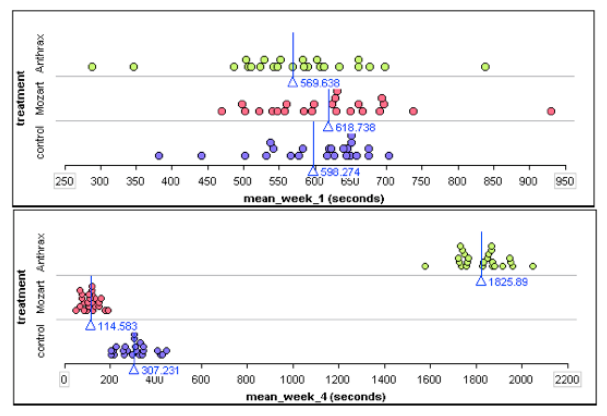
    A high school student named David Merrell did an experiment to examine if music affects the ability of mice to run a maze. The explanatory variable was exposure to music. He had three treatment groups: one group listened to heavy metal music by the group Anthrax. A second group listened to Mozart. The third group never heard music. This last group is the control group.

    The response variable was the average time (in seconds) to complete three runs. Every week the mice ran the maze three times. Merrell recorded each mouse’s average time for the week.

    Direct controls of potential confounding variables:

    • Merrell trained all of the mice to run the same maze.
    • He gave all mice the same amount of food and light.
    • All mice had the same approximate age and weights.
    • During the treatment phase, the mice were exposed to the treatment for the same amount of time, e.g. mice heard music at 70 decibels for 10 hours a day for a month.

    Results:

    By the end of the month, the Anthrax group was much slower at running the maze. The Mozart group was much faster. The dotplots below show average run times for the first and last week of the experiment. Each dot represents one mouse. The X-value is the mouses average run time for the week. (Each mouse ran the maze 3 times each week.) The blue line is the mean run time for each treatment group.

    1st graph = week 1 stacked dotplots for three groups of mice; 2nd graph = stacked dotplots for  three groups of mice

    If you are curious, here is a video of Merrell explaining his experiment.

    ()


    Prompt

    Merrell claims that he randomly assigned mice to treatment groups. Does the data shown in the dotplots above support his claim? Why or why not?


    Module 6 Discussion Board

    Use the Module 6 (opens in a new tab) to ask questions or provide feedback about the problems in any Module 6 activity – including this peer-reviewed assignment.


    Review Feedback

    • Instructor feedback is only available after an assignment is graded.
    • Use these (opens in a new tab) to learn how to review feedback.

    Click the “Next” or > button to continue.

    Content by Cuyamaca College math faculty and licensed under the .

    Rubric

    Formative Assessments

    Formative Assessments

    Criteria Ratings Pts

    This criterion is linked to a Learning OutcomeAnswering the Prompt

    10 ptsFull CreditThe first submission demonstrates a good-faith effort to address each part of the Prompt. Either in the first draft or the optional final draft, all parts of the “Prompt” are addressed and the responses demonstrate attainment of the learning objectives in the “Progress Check” section of the assignment. The answers are correct. The writing/work is clear. The explanation/work is reasonable, well-organized, and easy to follow.8.5 ptsMostly CorrectThe first submission demonstrates a good-faith effort to address most of the Prompt. In the optional final draft all parts of the “Prompt” are addressed, and the responses demonstrate attainment of the learning objectives in the “Progress Check” section of the assignment. The answers are mostly correct. The writing/work is clear. The explanation/work is reasonable, well-organized, and easy to follow.

    6 ptsOne or more incorrectThe first submission demonstrates a good-faith effort to respond to a smaller portion of the Prompt. In the first draft or the optional final draft, one or more parts of the “Prompt” are not addressed or are incorrect. Or, answers do not demonstrate attainment of the learning objectives in the “Progress Check” section of the assignment. Or, answers are correct, but the writing/work is unclear, incorrect, or difficult to follow.0 ptsNo MarksThe first submission does not demonstrate a good-faith effort to address the Prompt.

    10 pts

    Total Points: 10

    Requirements: 5 h